 GridBT
How GridBT Works
GridBT places a ladder of limit orders above and below an anchor price. Every time one order fills, the bot places a counter order one level away. That repeating buy-sell cycle is where grid profit comes from.
The grid
The anchor
When you seed a symbol, GridBT records the market price at that moment as the anchor. All grid levels are calculated from the anchor and stored permanently in the database. The same grid levels are always used, regardless of how many times the bot is restarted.
Grid levels
The grid uses geometric spacing: each level is a fixed percentage step above or below the one next to it. Think of it as percentage-based orders on a ladder rather than fixed dollar intervals. With the default
spacingPct = 0.37, each step up multiplies the price by 1.0037 and each step down divides by 1.0037. This means the dollar gap between orders is naturally wider at higher prices and narrower at lower prices, so the grid stays proportionate across any price range without any manual adjustment.As market price moves through the grid, it passes through levels. When price leaves a level, that level becomes vacant and the bot immediately places a new order there, keeping every level in the grid populated with an active limit order at all times.
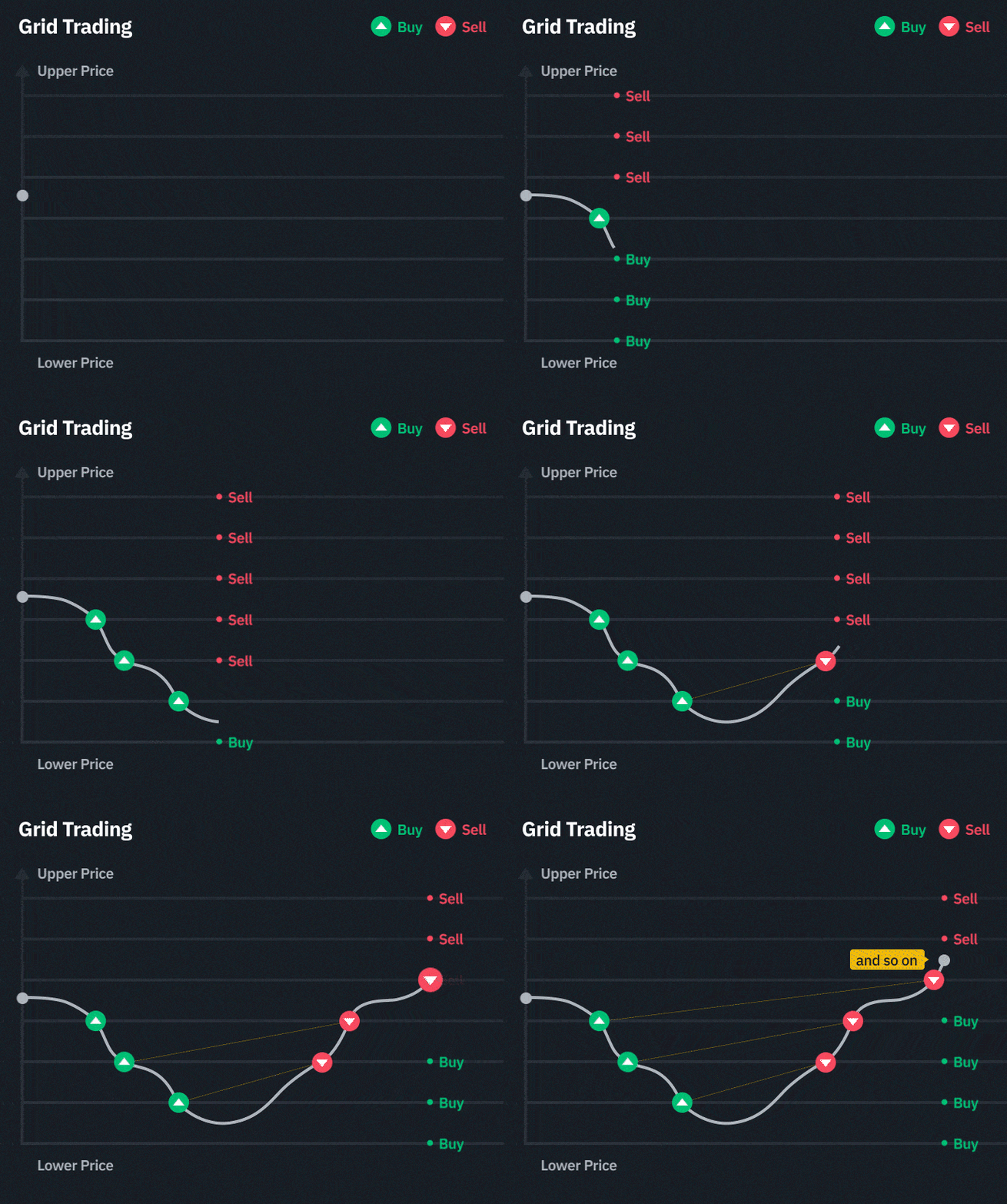
Below is an example grid for HYPEUSDT anchored at $30.00 with
spacingPct = 0.37:| Level | Price | Order type |
|---|---|---|
| +5 | $30.5591 | Sell |
| +4 | $30.4464 | Sell |
| +3 | $30.3342 | Sell |
| +2 | $30.2224 | Sell |
| +1 | $30.1110 | Sell |
| 0 | $30.0000 | Anchor (no order) |
| -1 | $29.8891 | Buy |
| -2 | $29.7785 | Buy |
| -3 | $29.6681 | Buy |
| -4 | $29.5581 | Buy |
| -5 | $29.4483 | Buy |
| ±6 to ±20 | ... | and so on until the 20th order |
By default, GridBT is configured with 20 orders per side (open and close each). With both your long and your short active on one symbol, that is 4 sides × 20 orders = 80 live limit orders per symbol, all placed and reacting in real time.
Your long and short are independent
GridBT runs in Bybit Hedge Mode, meaning your long and your short on the same symbol are completely independent. Both run at the same time. Your long never converts into a short, and your short never converts into a long. They each have their own position, their own orders, and their own grid.
How orders cycle
Each position direction uses two order types:
- Open orders build your position. For your long, these are buy orders placed below market. For your short, these are sell orders placed above market.
- Close orders reduce your position and capture profit. For your long, these are sell orders placed above market. For your short, these are buy orders placed below market.
When a close order fills, the bot immediately places a new open order at that level. When an open order fills, the bot places a new close order one level away. This is the cycle that keeps the grid running continuously.
Your long and short each need an existing position to place close orders. Open orders can always be placed as long as exposure limits allow it. See Your Position Sizing for how seed amounts determine your grid distance and risk profile.
How settings are resolved
Your config has three layers. The most specific setting always wins:
- Pair overrides: highest priority. A value set here applies to one specific symbol and direction only.
- Mode overrides: applies to all your longs, or all your shorts, unless a pair override takes precedence.
- Defaults: the baseline for everything. Any setting not overridden at a higher layer falls back to this.
Think of it as a waterfall: pair beats mode, mode beats defaults.
For example, HYPEUSDT has no overrides at all, so it inherits every setting from
modes, then defaults. LINKUSDT sets its own orderSizeUsd per direction, which takes priority over whatever modes.long or modes.short say. ZECUSDT widens spacingPct on both directions to suit a more volatile asset.// Settings flow: pair → mode → defaults (first match wins)
"pairs": {
"HYPEUSDT": [
{ "enabled": true, "mode": "long" },
{ "enabled": true, "mode": "short" }
// No overrides: fully inherits from modes and defaults
],
"LINKUSDT": [
{ "enabled": true, "mode": "long", "orderSizeUsd": 10 },
{ "enabled": true, "mode": "short", "orderSizeUsd": 7.5 }
// orderSizeUsd set per direction, overrides modes.long / modes.short
],
"modes": {
"long": {
"orderSizeUsd": 10
},
"short": {
"orderSizeUsd": 5.5 // $5.50 is above Bybit’s minimum order size
}
},
"defaults": {
"spacingPct": 0.37, // 0.37% grid spacing
"ordersPerSide": 20, // 20 orders per side
"orderSizeUsd": 10, // $10 per order (overridden by mode)
"maxNetExposureUsd": 1000, // $1000 max net
"maxGrossPositionUsd": 5000, // $5000 max gross
You only need to set what you want to change. Everything else is inherited from the layer below.
Tuning your grid
The starter profiles have battle-tested defaults that work well for most setups. When you are ready to tune:
| If you want... | Adjust this |
|---|---|
| More fills per day | Lower spacingPct (tighter levels, more frequent cycling) |
| More profit per fill | Raise spacingPct (wider levels, larger capture per cycle) |
| More exposure per pair | Raise orderSizeUsd and maxNetExposureUsd together |
| Longer grid distance before depletion | Raise ordersPerSide |
| Less risk per pair | Lower maxNetExposureUsd |
See Config Reference for every setting with defaults and examples.
Minimum order size
Bybit enforces a minimum order quantity on each symbol. GridBT automatically rounds your
orderSizeUsd up to the nearest tradeable size, so you never need to calculate this manually.Most USDT perpetual pairs have a $5 minimum notional. High-priced assets have larger effective minimums because the minimum quantity constraint dominates. BTCUSDT has a minimum of 0.001 BTC. At $70,000 that is a $70 minimum per order. If you configure
orderSizeUsd: 10 on BTCUSDT, every order will be placed at $70 instead. This directly affects your grid distance, since fewer orders fit within your seed amount. Always verify your effective order size in the live dashboard after seeding.Explore next
Understanding PnL
Why Bybit shows negative PnL while your dashboard shows profit.
Rebalancer
How the bot detects and corrects position imbalances automatically.
Config Reference
Every setting explained with defaults and examples.
Risk & Safety
Exposure limits, liquidation distance, and built-in protections.